

Website Builder for Contractors: Quote Requests From the Site, No Agency Retainer
Homeowners hire the contractor who replies first. Still, many crews pay an agency retainer or rely on a “Contact Us” page that doesn’t work on mobile. Clutch’s 2025 study showed that 83 percent of small businesses already had a website and 41 percent used no-code builders like Wix and Squarespace. Jobber later reported that 56 percent of customers expect a reply within an hour, yet only 20 percent of trades deliver. This guide ranks 10 website builders for contractors by one yardstick: can their forms grab photos and alert you fast enough to win the job?
Quick answer: Which builder should you pick
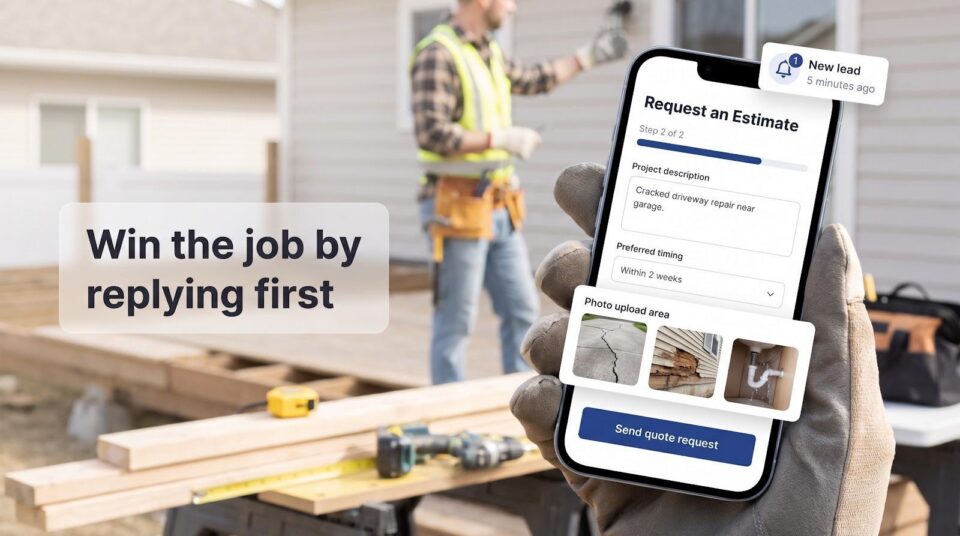
Need the shortcut? Match your situation to one of these website builders for contractors, then dive deeper below.
- Wix: best DIY choice when you want powerful forms and an inbox you already use
- WordPress: ideal if you need long-term ownership plus multi-location SEO flexibility
- Jobber Websites: simplest route when your crew already runs on Jobber for scheduling and invoicing
- Websites by Housecall Pro: works for HCP users who prefer a fully managed site
- Squarespace: shines for remodelers who sell through before-and-after photography
- Zarla: quickest contractor-specific AI draft, complete with a built-in lead inbox
- GoDaddy Airo: choose this when you want AI-generated forms and the option to download the code
- Durable: spins up a live site in seconds and includes a lightweight CRM
- Yola: covers tight budgets yet still accepts customer photo uploads
- Spark: builds custom account-based sites with client logins and payments from a chat prompt
No single tool wins every category. Pick the platform that already fits your software stack and sales process, then keep reading for plan-level details that prevent buyer’s remorse.
How we ranked these website builders
We viewed each website builder for contractors as a lead-routing tool, not a glossy brochure. To make the cut, a platform had to 1) publish on your domain without an agency retainer, 2) collect a photo-ready quote request and route it into an inbox, CRM, or workflow you already use, and 3) post transparent plan-level prices.
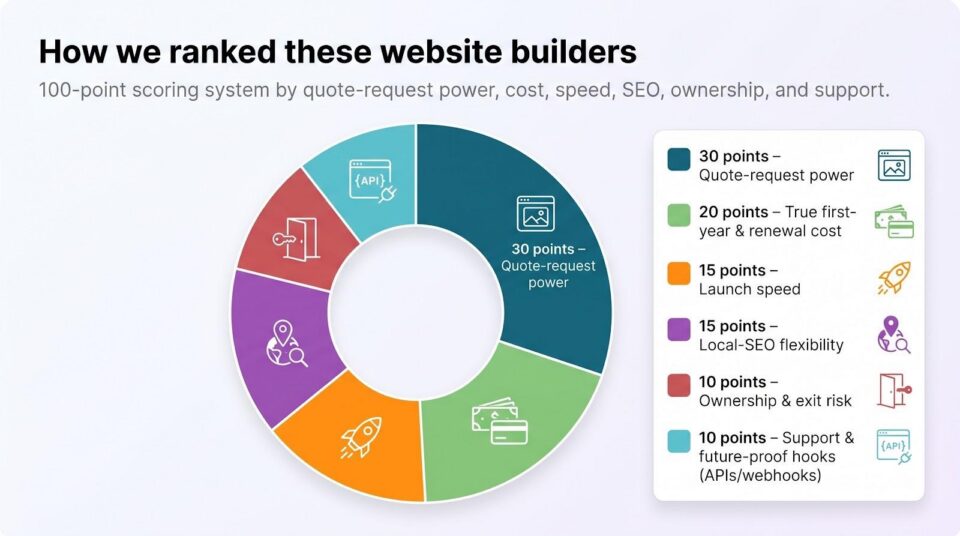
We then scored every finalist out of 100 points: 30 for quote-request power, 20 for true first-year and renewal cost, 15 for launch speed, 15 for local-SEO flexibility, 10 for ownership and exit risk, and 10 for support plus future-proof hooks like APIs or webhooks. We spot-checked plan names and prices on November 7, 2026; platforms that still needed a sales quote slid to the honorable-mention list.
The outcome is a shortlist you can trust to capture real project details and alert your team before a rival crew claims the job.
Publish price vs. quote-ready price
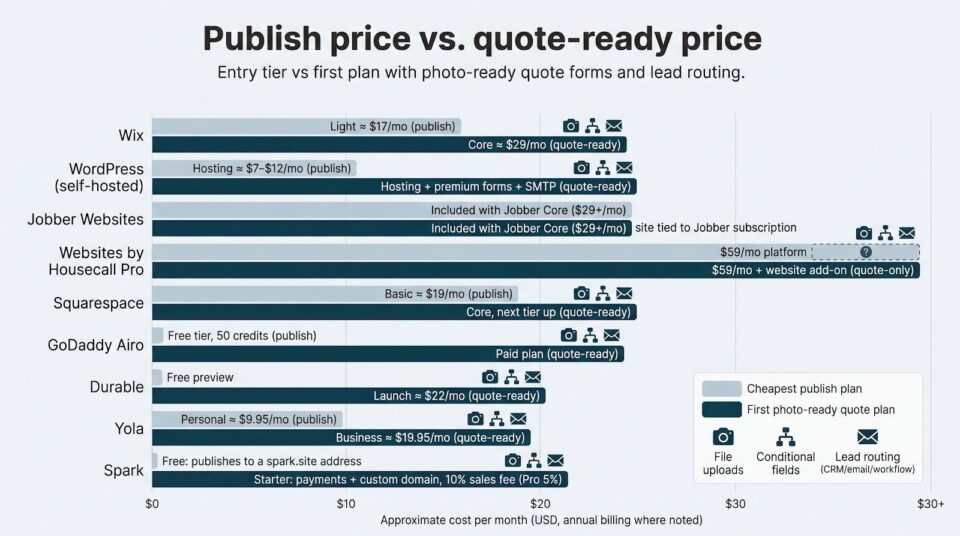
Entry plans for a website builder for contractors often skip the very feature that wins jobs: a mobile quote form with photo uploads. We compared each platform’s cheapest publish plan with the first tier that lets a homeowner send images and routes the lead to a place you’ll notice. Prices were verified on November 7, 2026 and reflect annual billing unless noted.
| Platform | Cheapest publish plan | First plan with photo-ready quote form | Key caveat |
| Wix | Light (about $17/mo) | Core (about $29/mo) | Light blocks file uploads and advanced logic |
| WordPress (self-hosted) | Hosting about $7 to $12/mo | Add a premium form plugin (from $99/yr) plus SMTP | Total cost varies with theme, security, and time |
| Jobber Websites | Included with any Jobber plan from $29/mo | Same tier | Site is live only while your Jobber subscription is active |
| Websites by Housecall Pro | Basic platform $59/mo | Website add-on (price not public) | Request the add-on quote and cancellation terms |
| Squarespace | Basic $19/mo | Core (next tier up) | Core unlocks Zapier CRM connections |
| Zarla | Premium $10.99/mo (36-month prepay) | Same tier | Month-to-month rises to $29/mo plus sales fees |
| GoDaddy Airo | Starter (paid tier) | Professional (paid tier) | Credit system adds a learning curve |
| Durable | Free preview | Launch $22/mo | Native forms lack file uploads; embed a third-party form |
| Yola | Personal $9.95/mo | Business $19.95/mo | Attachments and export need Business or higher |
| Spark | Free (publishes to a spark.site address) | Starter $25/mo + 10% fee on sales | Payments and a custom domain need a paid plan |
Treat the quote-ready column as a reality check. If uploads, conditional fields, or CRM routing hide behind a higher tier, budget for that plan now because a lost qualified lead will cost more than an extra few dollars a month.
Spark: build a custom business flow before you pay
Spark (spark.site) is a website builder for contractors who want to sketch a full client portal before spending a dime. On Spark’s pricing page, the Free plan publishes that draft on a spark.site address, so customers can sign up and look around before you commit; taking payments and using your own domain start on a paid plan. Type your idea into a chat, “show my services, let owners log in, accept deposits,” and the platform assembles pages, customer accounts, and Stripe payments, ready to publish.
Pricing stays simple once you publish. The Starter plan costs $25 per month plus a 10 percent sales fee, while Pro climbs to $200 per month and lowers the fee to 5 percent. Both paid tiers include a custom domain, remove the Spark badge, and take payments; the fee on sales is billed on your Spark invoice after each billing period instead of being taken from each payment.
For contractors, the fit is a site where repeat clients log in to one account and pay deposits online, built and edited by describing what you want.
Wix: best all-around DIY quote-request builder
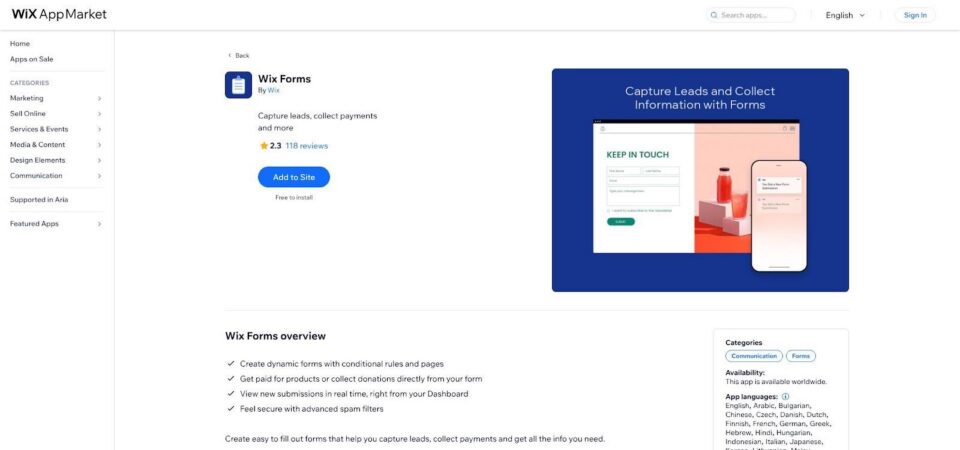
Wix (wix.com) is the website builder for contractors who want strong form tools without touching code. Open the drag-and-drop editor, choose the Price Quote template, and you already have conditional questions, multi-step logic, and signature boxes. Upgrade straight to the Core plan (about $29 per month on annual billing) and the form accepts photo uploads, so a homeowner can send snapshots of a cracked driveway before tapping Send.
Wix contractor quote form with multi-step logic and photo uploads
When the form fires, every answer and image lands in Wix CRM. Automations can email the prospect, ping your phone, create a pipeline card, or trigger a webhook to Zapier or ServiceTitan, so follow-up never slips.
Speed is the other advantage. Swap in branding, add project photos, and publish on your own domain in one evening. Reviews, live chat, and bookings sit one click away in the App Market, although each add-on raises the bill.
Lock-in is the trade-off. A Wix site stays on Wix servers; you can export text and images, but layouts and apps remain behind. If you might outgrow the editor, budget time for a future rebuild.
Choose Wix when you need the fastest route to a professional site that gathers every detail required to quote with confidence, and start on Core so the form can accept images from day one.
WordPress: best for ownership and multi-location SEO
WordPress (wordpress.org) is the website builder for contractors who want long-term control instead of pure drag-and-drop ease. On November 6, 2026, the open-source CMS powered 39.5 percent of all sites and 58.2 percent of those using a known CMS (W3Techs). That reach means thousands of themes, plugins, and freelancers sit one search away.
Ownership is the headline perk. You choose the host, point the domain, and keep the full database and code. Multi-branch contractors can add service-area pages, license-number schema, and custom URLs without waiting on a SaaS roadmap.
Lead capture depends on your form plugin. WPForms, Gravity Forms, and Formidable Forms add multi-step logic, photo uploads, hidden UTM fields, and webhooks to CRMs or field-service tools. Pair an SMTP plugin so quote emails skip the spam folder.
Freedom brings chores. Core and plugin updates show up almost weekly, and ignoring them can invite security issues. Budget time or a managed-hosting fee for backups, malware scans, and performance tuning. A lean theme plus compressed images will keep Core Web Vitals in the “good” range.
Cost scales with ambition. Entry hosting runs about $7 to $12 per month. Add a premium form plugin (about $99 per year), security, and maybe a CDN, and a typical three-year bill still beats many SaaS builders when you need dozens of local pages. Choose WordPress if you want SEO headroom, full ownership, and the freedom to bolt on any workflow the trades dream up tomorrow.
Jobber Websites: best when your team already runs on Jobber
Jobber (getjobber.com) includes a website builder that lives inside the same dashboard you use for scheduling, quoting, and invoicing. The tool imports your services, suggests copy for up to 100 pages, and publishes on a custom domain in minutes, with no syncing or plugins required.
The quote form is the star. It grabs contact details, service type, measurements, preferred date, and up to ten photos. When a homeowner taps Request an Estimate, Jobber creates a client record, drops the request into your pipeline, and pings the team, so you can schedule an assessment or build a quote without re-typing.
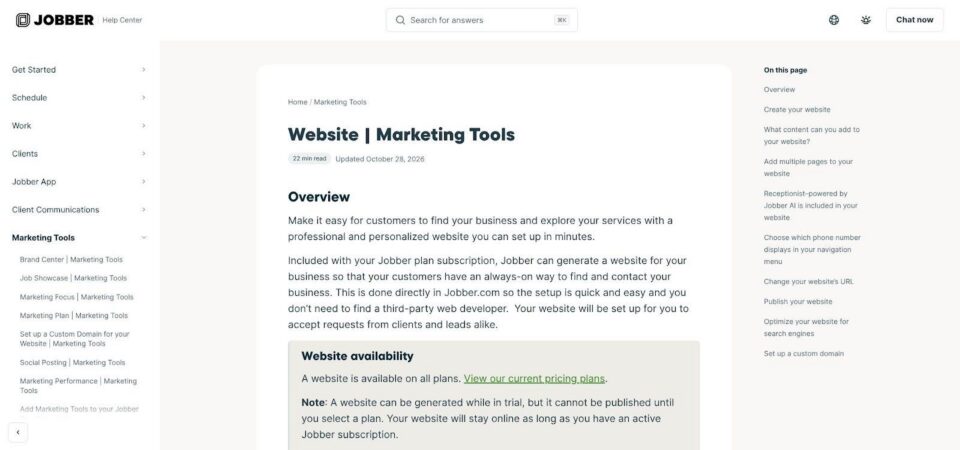
Jobber Websites quote form flowing into the Jobber pipeline
Because the site and back office share one database, you get an audit trail from first photo to final invoice, plus mobile-ready layouts, Google review widgets, and basic SEO settings.
Pricing is simple. Every paid Jobber plan includes the site. Core runs about $29 per month after introductory promos (price verified November 7 2026) and covers hosting, SSL, and unlimited edits. The trade-off is lock-in: cancel Jobber and the site goes dark. Pick this bundle only if your crew already lives in Jobber every day.
Websites by Housecall Pro: best for HCP users who want a hands-off build
Housecall Pro (housecallpro.com) offers a website builder that lets the software you already use for booking, dispatch, and invoicing power a public site without another dashboard to learn. After a quick onboarding call, the HCP team drafts your pages and handles future edits through tickets, so no late-night logins.
Each site launches with a Lead Form that captures job details, preferred dates, and project photos. New submissions land in your Job Inbox, send a text alert, and show up in the sales Pipeline. The whole path from first click to paid invoice lives in one database.
SEO basics arrive ready to go: page titles, meta descriptions, alt text, LocalBusiness schema, an XML sitemap, plus linked Search Console and Google Analytics.
Cost is the wild card. The core platform starts at about $59 per month on an annual plan (price verified November 7 2026), but the website add-on is quote only. Confirm the monthly fee, ownership terms, and what happens if you cancel HCP. Routine edits take one to three business days, so urgent changes still need a call.
Pick the Housecall Pro website when your crew already relies on HCP daily and you want one vendor to run both the site and the scheduling engine.
Squarespace: best for portfolio-driven remodelers and design-build firms
Squarespace (squarespace.com) is the website builder for contractors who win work with visuals. Its construction templates spotlight galleries, before-and-after sliders, and full-bleed hero images, letting craftsmanship replace clutter.
Quote capture hides just under that polish. Drop in a Form block to gather follow-up questions, hidden UTM fields, and up to five files, perfect for floor-plan PDFs or kitchen snapshots. Move to the Core plan and Zapier can push those leads into HubSpot, Pipedrive, or another CRM.
Routine upkeep stays light. SSL, responsive layouts, and automatic image compression ship by default, while built-in analytics show which service pages convert. Scheduling and invoicing plug in as optional add-ons.
Lock-in is the trade-off. You can export basic pages and blog posts, but portfolios, store sections, and design tweaks stay behind, so keep original photos and copy handy if a future migration feels likely.
Pick Squarespace when your sales cycle leans on visual proof and you would rather polish photos than patch plugins. Upgrade to Core once CRM integration is on the roadmap.
Zarla: best contractor-specific AI builder with built-in lead management
Zarla (zarla.com) markets itself as a website builder for contractors, not a generic one-page generator. During setup it asks which trade you serve, your service areas, and whether you need a before-and-after gallery. About 30 seconds later you get a draft site, a quote form that accepts up to five project photos, and a mini-CRM that stores each request.
The form already asks for budget, timeline, and project type, so you capture real scope instead of just a name and number. When a homeowner taps Send, Zarla emails the details, logs them in its CRM, and (on the Business tier) sends a text alert, all without Zapier or other connectors.
Local visibility tools round out the package: service-area pages, embedded maps, automatic Search Console linkage, and a reviews widget that surfaces recent Google feedback on your site.
Pricing rewards long commitments. On November 7, 2026, Premium runs $29 month-to-month or $10.99 per month on a 36-month prepay; Business is $49 month-to-month or $16.99 on the same term. Zarla adds its own fee on shop, gift card, payment link, and invoice sales: 2 percent on Premium and 1 percent on Business.
Limitations reflect Zarla’s newness. Independent reviews remain sparse compared with Wix or Squarespace, and you can’t export the full site if you migrate later. Still, for contractors who want AI speed plus a workflow tuned to square footage and job-site photos, Zarla offers a focused starting point.
GoDaddy Airo: best for AI-built workflows you can download and host anywhere
GoDaddy Airo (godaddy.com) positions itself as a website builder for contractors who want AI speed today and code ownership tomorrow. Type a prompt like “Build a roofing site for Austin that lets clients upload photos and request an estimate,” and Airo produces pages, a database, and a form with conditional fields and file uploads.
The standout appears after you publish. Click Download and Airo zips the project so you can host it on any server or extend it with custom plugins, an escape hatch rare among hosted AI tools.
Pricing starts with a free tier that includes 50 free credits. Paid Starter and Professional tiers follow, and Professional adds bookings, deposits, and Stripe or GoDaddy Payments. Credits refresh monthly on paid plans, so track usage when regenerating large galleries. Airo forms don’t yet push into GoDaddy Conversations, so real-time alerts rely on email or webhooks.
Choose GoDaddy Airo if you want AI to handle the heavy lifting now and the freedom to walk away with your code later, without waiting on a platform roadmap.
Durable: best for a thirty-second site plus a built-in mini-CRM
Durable (durable.co) markets itself as a website builder for contractors who want a live draft in about 30 seconds. Enter your trade and city, then click Generate. The platform spins up service pages, pricing blurbs, and a contact form, all before your coffee cools.
Every submission flows into Durable’s lightweight CRM, where you can tag the lead, add notes, and, on paid plans, send AI-written follow-up emails. A booking widget and simple quote calculator make the tool feel more like starter field-service software than a static site.
The current drawback is file uploads. The native form can’t accept project photos, so trades that quote from images must embed an external uploader or ask clients to email them.
Pricing stays simple. On November 7 2026 the Launch plan costs about $22 a month on annual billing and unlocks the custom domain, forms, and CRM. Grow adds deeper automation, but most solo contractors stay on Launch until lead volume spikes. Durable sites can’t be exported, so migrating later means rebuilding elsewhere.
Choose Durable when speed and an integrated mini-CRM matter more than native photo uploads on day one.
Yola: best simple budget builder with file attachments
Yola (yola.com) positions itself as a lean website builder for contractors who need a working quote form on a tight budget. Start on the free tier to test layouts, then upgrade to a paid plan (about $9.95 a month on annual billing, price verified November 7 2026) to connect a custom domain, unlock analytics, and fine-tune basic SEO settings.
The Business tier’s form widget is the draw. It supports unlimited fields and lets homeowners attach files up to 25 MB, whether that’s drywall photos, permit PDFs, or a short video of a dripping valve. Submissions can route to multiple email addresses so the right person sees the lead right away, but Yola ships with no built-in CRM.
The interface stays intentionally minimal, with no app store and no hidden upsells, which helps owners who glaze over at plugin menus. The trade-off is reliance on email alone unless you forward leads to an external CRM.
Yola does offer a rare escape hatch: Business and Business Elite users can download a full site archive, including images and PDFs, before moving to another host. Choose Yola when price outweighs bells and whistles, yet you still need a quote form that accepts project photos and lands in the correct inbox every time.
Honorable mention: Hostinger AI Builder
Hostinger’s AI Builder (hostinger.com) earns a nod for contractors who want the lowest upfront cost. On a 48-month prepay, the Premium tier runs about $1.99 per month (price checked November 8 2026) and includes AI site generation, a custom domain, basic contact forms, and code export (HTML, CSS, and JavaScript) through its new Agentic mode. Renewal climbs to roughly $10.99 per month.
Two gaps keep AI Builder out of the main list. First, the native form can’t accept project photos, so trades that quote from images must embed an external uploader. Second, lead routing stops at email or CSV; there’s no built-in CRM or automation. Choose Hostinger when price beats convenience and you’re ready to bolt on both photo intake and lead management later.
How to build a quote-request form customers will finish
Long, cluttered forms chase prospects away, but ask too little and you attract tire-kickers who never reply. A two-step flow strikes the balance.
Step 1 covers the essentials: name, phone or email, ZIP code, and a dropdown for service type. You’ll know right away whether the job sits inside your trade and territory. A simple progress bar reassures visitors they’re almost done.
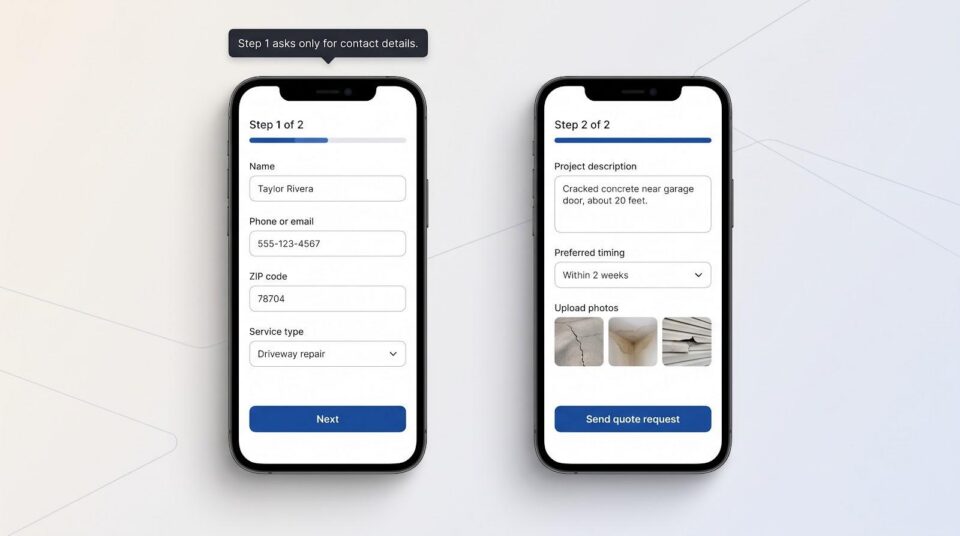
Step 2 adds detail: a short project description, preferred timing, and room for two or three photos. Zuko’s 93-million-visit study (Jan 2022 to Apr 2025) found that only 51.7 percent of users who start a form finish it, so a clear layout matters. Promise a fast reply. Jobber’s 2025 survey shows that 56 percent of home-service customers expect contact within an hour, yet only 20 percent of businesses meet that mark (data verified Nov 7 2026).
Before you publish, add three guardrails:
- Conditional logic so remodel prospects skip HVAC-only questions.
- A backup notification in case the main estimator is out.
- Hidden UTM fields to trace ad spend to real revenue.
End with an email that repeats the visitor’s answers and explains the next step. Design once, test it on your own phone, and your website builder for contractors turns into a silent estimator that works while the crew stays on the job.
What a “no agency retainer” costs over three years
The lowest sticker price often hides the bigger bill that shows up after month twelve: domain renewals, branded email, file-upload upgrades, and payment fees.
Start with the essentials: the subscription, a custom domain once the free year ends, and branded email. Those three items nudge a $20 headline plan closer to $30 by month 13. Add quote-ready extras. Wix Light users move to Core for file uploads, Squarespace Basic owners step up to Core for Zapier, WordPress needs a premium form plugin plus SMTP, and Housecall Pro tacks on a separately quoted website fee.
Payment fees add more. Spark bills a 10 percent (Starter) or 5 percent (Pro) fee on sales on its invoice, while Zarla and Durable charge smaller platform percentages that can still outpace a flat monthly fee on high-ticket jobs.
Multiply true monthly spend by 36 months, add two domain renewals, and one plugin or theme upgrade, and the pattern is clear (prices verified Nov 7 2026):
- Wix Core totals a little above $1,200 once a few apps join the cart.
- Managed-hosting WordPress, premium forms, and security land near $900 (labor not included).
- Jobber Websites stay roughly $1,050 because the site rides the same subscription.
- Squarespace Core lands in a similar range if you skip a paid CRM.
- Prepaid Zarla drops to about $395 for three years; month-to-month runs close to $1,100 once sales fees kick in.
Run the numbers before clicking “Buy.” The cheapest advertised tier is rarely the cheapest long-term choice for a website builder for contractors.
Local SEO, Google Local Services Ads, and page-speed facts contractors can bank on
A website builder for contractors only helps when people can find you, and that still comes from Search, Maps, and Google Local Services Ads (LSAs).
Start with accuracy. Claim your Google Business Profile and mirror every detail (name, address, hours) in the site footer. Even tiny mismatches confuse crawlers and prospects.
Publish real service and location pages, each with unique photos, a short job story, and a clear quote button. Platforms such as WordPress and Wix make those pages fast; Jobber and Housecall Pro auto-generate basic versions. Near-duplicate town lists do more harm than good.
Page speed matters, but perfect scores don’t guarantee rankings. Google’s current “good” bar (LCP ≤ 2.5 s, INP < 200 ms, CLS < 0.1, checked Nov 7 2026) is table stakes. Compress images and avoid widget bloat and every builder on our list can pass.
Watch LSAs. Google is folding pay-per-lead ads into Performance Max and relabeling badges as Google Verified. Contractors must reconnect billing and reverify identity this year, and AI-generated or heavily edited images are banned in New York and the EU. Use authentic project photos in ads and galleries to stay compliant.
Do the basics (consistent data, focused local pages, fast images, genuine photos) and any builder above can compete. Skip them and even the flashiest platform will stay invisible.
Mobile, accessibility, privacy, and trust checks you can’t skip
Most prospects visit your site on a phone, so the quote button must show above the fold and the form should work one-handed. Open the site on mobile and confirm three items: tap-to-call appears instantly, field labels stay visible while typing, and the photo upload accepts camera-roll images without forced resizing.
Run the same path on a laptop using only the keyboard. Every input and error message should be reachable with the Tab key, and a high-contrast focus ring needs to show the active field. The U.S. DOJ lists keyboard navigation, visible labels, and clear errors as common accessibility barriers (guidance reviewed Nov 7 2026).
Privacy fuels trust. Explain in plain words what data you collect, why you need it, and how long you keep it. Separate “reply to my quote” consent from any marketing opt-in to stay within CAN-SPAM and TCPA rules.
Back up credibility with real project photos, required license numbers, and a promise to reply within one business hour, then honor it. Spend twenty minutes on these checks and your website builder for contractors becomes a lead machine that works for every visitor, including those who rely on assistive tech.
Seasonality and future-proofing: launch six weeks before peak demand
Contractor demand rises and falls with the calendar. The Home Improvement Research Institute notes that retail sales for building materials and garden supplies consistently peak between April and November. Publish or rebuild your site six to eight weeks before your own busy window so Google can index new pages and ad campaigns can learn before the phones light up.
Future-proof the build at the same time. Prioritize webhooks, open APIs, and clean code embeds so you can later add AI estimating, 3-D previews, or real-time material pricing. WordPress and GoDaddy Airo already allow full code control; Wix, Squarespace, and Zarla expose webhooks or Zapier; Jobber and Housecall Pro push new features through automatic updates.
Augmented reality is moving from novelty to expectation in exterior and remodel work. Google’s <model-viewer> lets homeowners drop a virtual deck in the backyard with nothing more than an HTML embed, so confirm your chosen builder supports custom code.
Finally, manage capacity. Most platforms let you cap bookings or add rush-fee toggles. Use them. Over-promising during high season hurts reviews faster than any slow website.
Treat the site like a work truck; service it in the slow months, load it with the right tools, and it will carry you profitably into the next busy stretch.
Decision tree: pick your first move in seconds
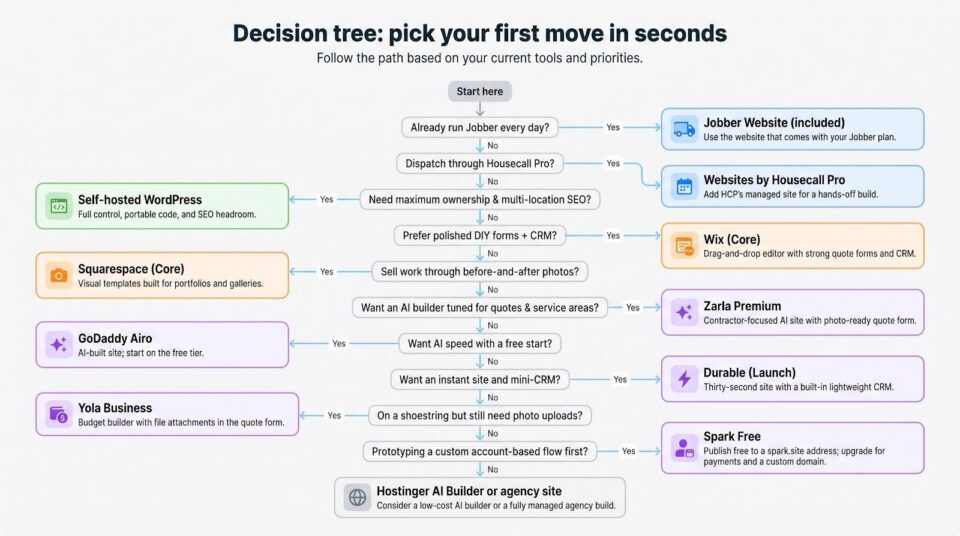
Already run Jobber every day? Use the website that comes with your plan.
Dispatch through Housecall Pro and want a hands-off build? Add HCP’s managed site.
Need maximum ownership and multi-location SEO? Spin up WordPress on reliable hosting.
Prefer a polished DIY editor with strong forms and a built-in CRM? Choose Wix (Core).
Sell work through dramatic before-and-after photos? Go with Squarespace (Core).
Want an AI builder that speaks quotes and service areas? Try Zarla Premium.
Need AI speed plus downloadable code? Generate with GoDaddy Airo (Professional).
Want an instant site and mini-CRM in one click? Launch Durable (Launch).
On a shoestring but still need photo uploads? Upgrade Yola to the Business tier.
Want a custom account-based flow with client logins and payments? Build it on Spark Free, then move to Starter to take payments on your own domain.
If none of these lanes fit, check the honorable mention, Hostinger AI Builder, or consider whether a fully managed agency site, not a DIY builder, will solve the real bottleneck.
Frequently asked questions
What is the best website builder for contractors?
No single tool fits every crew. Use Wix for fast DIY forms, WordPress for ownership and multi-location SEO, Jobber or Housecall Pro if those systems already run your jobs, and Zarla for an AI-drafted, contractor-specific site.
Is there a truly free option for a contractor website?
Free plans show platform ads and block custom domains. They’re fine for testing, not for real leads. Budget at least the first paid tier, about $20 a month, for a quote-ready site.
Should I choose Wix or WordPress?
Pick Wix when speed and a built-in CRM matter most. Choose self-hosted WordPress for unlimited SEO control, plugin freedom, and full code ownership.
Is the website included with Jobber enough?
Yes, if your team already relies on Jobber’s scheduling and quoting tools. The built-in site captures photos and drops leads straight into your Jobber pipeline but isn’t cost-effective as a stand-alone subscription.
How much does a contractor website cost without an agency?
A mid-tier DIY builder typically runs $900 to $1,200 over three years once you add a domain, email, and a photo-upload form (prices verified Nov 7 2026).
What should a contractor quote form ask?
Start with contact details, ZIP code, and service type; finish with timing notes and two or three photos. Two concise steps convert better than one long scroll.
Do contractors need instant online estimates?
Not for complex work. A detailed request plus a fast human reply builds more trust than an automated number that misses hidden scope.
Will a website builder alone improve my local SEO?
It supplies the technical plumbing. Rankings rise when you add unique service-area pages, keep your Google Business Profile accurate, and serve fast images.
Do I own my website and domain?
You always own a separately registered domain. Open-source WordPress is fully portable, while most SaaS builders keep their code on their servers, so check export terms before you subscribe.
Can customers upload project photos from a phone?
Yes, if your chosen plan includes file uploads. Wix Core, Squarespace Core, Jobber Websites, Zarla Premium, and GoDaddy Airo Professional all accept mobile photos.
Conclusion
The best website builder for contractors is the one you’ll keep up. Pick a platform that connects to the software you already use, accepts photo-ready quote requests in minutes, and tells customers exactly when they’ll hear back. Nail those basics and the site shifts from digital flyer to silent estimator, filtering, routing, and warming leads while the crew stays on the job.
Spend twenty minutes today walking the quote path on your phone. If it feels effortless, you’re set for the next busy season. If it wobbles, choose a builder from the list above and tune the flow before the rush. Signed proposals and a steadier pipeline will follow.